This guide explains the partner model for Class, the end‑to‑end onboarding steps, access PIE sandbox (Partner Integration Environment), security checks, and what happens at launch.
Partner applications use OAuth 2.0 Authorization Code Flow to access data from one or more Class businesses. OpenID Connect is supported for user identity.
This is a high‑level overview of how to become a partner of Class from registering your interest, through compliance/security reviews, to receiving production keys and launching with joint marketing support.
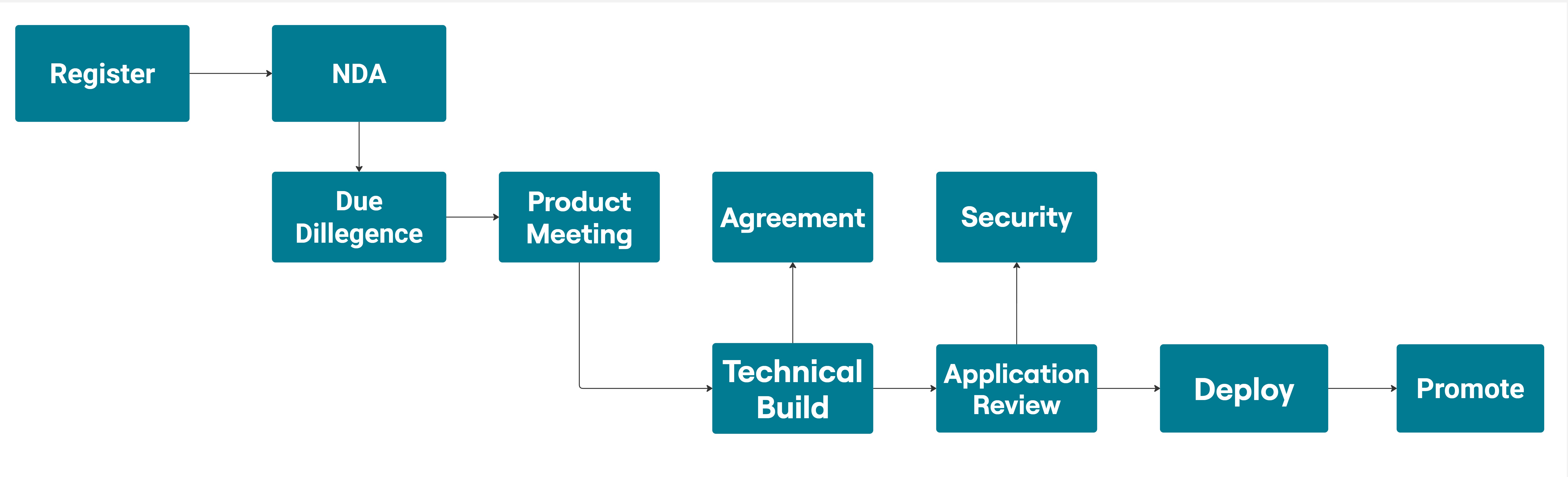
Pre-requisites to provide to the API team:
- A re-direct URL for your development/sandbox environment.
- Your logo (File Type: Jpeg, Dimensions: 220x67px and File Size: 100KB).
You will receive access to multiple business codes and a few sample funds under each business code.
Class will perform an application review, ensuring it meets minimum requirements. Please complete and return the Cyber Security Assessment form. The Cyber Security team will review the checklist to make sure it meets our minimum requirements.
For further information, email Partner Support at partners@class.com.au.