The Authorisation Code Flow is the recommended and most secure method of accessing the Class API. It is the only flow available to Partners, and Class recommends it for Clients as well.
The flow requires communication from secure servers over https, and requires users to authenticate with MFA — which is what allows it to meet ATO requirements. It also supports refresh tokens, so your application can continue to obtain data without sending the user through authorisation each time.
To use this flow you must register a redirect URL and an application logo. The logo identifies your application to users on the consent screen, and users can revoke your access at any time. See Access Class APIs for how to register these.
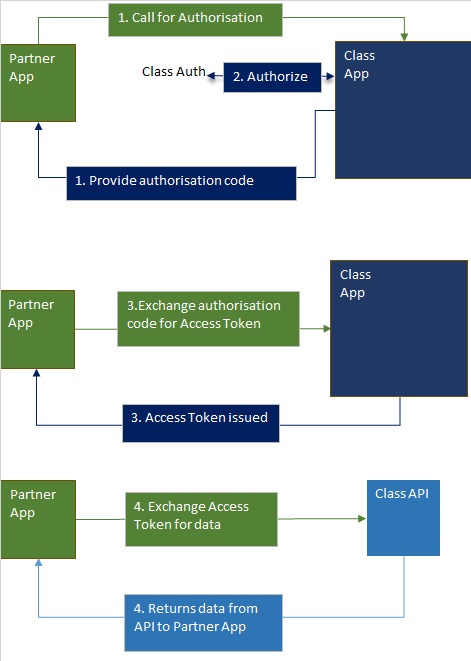
This flow is designed for integrations that can keep the client_secret confidential — server-side web applications, typically.
1. Send the user to the authorisation endpoint. Your integration redirects the user to Class, identifying your application and the scope of access you need.
https://app.class.com.au/connect/authorize2. The user authenticates and consents. Class authenticates the user, including MFA, and prompts them to authorise the access you requested.
3. Class redirects back to your application with an authorisation code appended to your registered redirect URI.
https://yourapp.yourdomain.com.au/class-callback?code=381553a0-d173-4df9-ac5f-5ed167dxxxxx&state=...4. Exchange the code for tokens. Your application posts the authorisation code to the token endpoint.
https://app.class.com.au/connect/tokenClass returns an access token and, if requested, an ID token and refresh token, along with the scope actually granted.
{
  "token_type": "bearer",
  "access_token": "gIcXxxp90FodZ8wFhdiEimminDE4Y1dTbW2AfhS859-xxxxxx",
  "id_token": "eyJ0eXAiOiJKV1QiLCJhbGciOiJSUzI1NiIsImtpZCI6Ij-xxxxxx",
  "refresh_token": "a2a86079-4885-44ec-9233-ac629a4xxxxx",
  "expires_in": "899",
  "BusinessName": "{Customer_Business_Name}",
  "BusinessCode": "{Customer_Business_Code}",
  "scope": "class_profile openid offline_access target:b/{Customer_Business_Code}"
}
5. Call the API. Use the access token as a Bearer token against the resource APIs.
The endpoints above are production. For PIE, use app.class-pie.com.au. See Environments for the full set of hosts.
Requests to the token endpoint require Basic authentication using the client_id and client_secret issued for your integration.
- Concatenate the
client_idandclient_secret, separated by a single colon:<client_id>:<client_secret> - Base64-encode that string.
- Send it in the
Authorizationheader, preceded byBasic.
Authorization: Basic PGNsaWVudF9pZD46PGNsaWVudF9zZWNyZXTvu78+The Authorization header is case-sensitive, including the word Basic.
Requests are made via HTTP GET to the authorisation endpoint. The endpoint URI can also be obtained dynamically from the authorization_endpoint field of the discovery document.
| Parameter | Required | Value | Description |
|---|---|---|---|
response_type | Yes | code | Must be code for this flow. |
client_id | Yes | Your issued client ID | Identifies your integration. |
redirect_uri | Yes | One of your registered redirect URIs | Must exactly match a registered redirect URI, including protocol, case, and any trailing character. A query string may be included and will be echoed back. |
scope | No | Space-delimited list | Describes the access requested. See Authorisation Scopes. |
state | Yes | Any string | Echoed back to mitigate CSRF. Class mandates a random value that cannot be linked to the user. See RFC 6749 §10.12. |
response_mode | No | query (default) or form_post | How the authorisation response is returned. |
prompt | No | none, login, consent | Controls login and consent prompting. Multiple values may be space-delimited, except none. |
login_hint | No | Email address | Pre-fills the login email field. |
Example request (wrapped for readability):
GET https://app.class.com.au/connect/authorize?
response_type=code&
client_id={your_client_id}&
scope=class_profile openid offline_access fund.read&
redirect_uri=https://yourapp.yourdomain.com.au/class-callback&
state=security_token%Y2eeg2eCMB5owJ&
prompt=consentOnce the request is handled, the user is redirected to the URI given in redirect_uri.
For unsuccessful requests, the response contains a single error parameter. See Error Codes.
For successful requests:
| Parameter | Value | Description |
|---|---|---|
code | An authorisation code | Exchanged for an access token in the next step. Single-use and short-lived. |
state | Any string | The same value supplied in the authorisation request. Verify it matches. |
Exchange the authorisation code for an access token via HTTP POST to the token endpoint.
| Parameter | Required | Value | Description |
|---|---|---|---|
grant_type | Yes | authorization_code | Must be authorization_code. |
code | Yes | Authorisation code | The single-use code from the authorisation response. |
redirect_uri | Yes | Same as the authorisation request | Must exactly match the redirect_uri used to obtain the code. |
Request headers
POST https://app.class.com.au/connect/token
Authorization: Basic PGNsaWVudF9pZD46PGNsaWVudF9zZWNyZXTvu78+
Content-Type: application/x-www-form-urlencoded; charset=utf-8
Request body
grant_type=authorization_code&
code=1fd827c4-9ea3-4290-a99a-84c7d62d8b11&
redirect_uri=https%3a%2f%2fyourapp.yourdomain.com.au%2fclass-callbackThe token endpoint returns JSON.
Success
{
  "access_token": "CBfgN5Z5...",
  "token_type": "bearer",
  "expires_in": "899",
  "scope": "target:b/OAUTH_TEST offline_access business.fund.create fund.read",
  "refresh_token": "9e0fccdb-ec4f-4e6a-ae60-83ad66be9547",
  "BusinessName": "OAuth Test Business",
  "BusinessCode": "OAUTH_TEST"
}
Error
{
  "error": "invalid_client",
  "error_description": "Client authentication failed"
}
See Error Codes for the full list of error values.
If offline_access was included in the granted scope, you can exchange the refresh token for a new access token without user interaction.
| Parameter | Required | Value | Description |
|---|---|---|---|
grant_type | Yes | refresh_token | Must be refresh_token. |
refresh_token | Yes | Your refresh token | From the previous token response. |
Request headers
POST https://app.class.com.au/connect/token
Authorization: Basic PGNsaWVudF9pZD46PGNsaWVudF9zZWNyZXTvu78+
Content-Type: application/x-www-form-urlencoded; charset=utf-8
Request body
grant_type=refresh_token&
refresh_token=9e0fccdb-ec4f-4e6a-ae60-83ad66be9547
Refresh tokens are single-use. The moment you exchange one, it is invalidated — store the new refresh token returned with each response. See Managing Access and Refresh Tokens.
- Environments — hosts for PIE and production.
- Authorisation Scopes — what to request.
- Managing Access and Refresh Tokens — token lifetimes and rotation.
- Error Codes — what went wrong.