This flow is available to Class Clients only — customers with a signed SSLA agreement accessing their own data. Partners and third-party integrations must use the Authorisation Code Flow.
Class also recommends the Authorisation Code Flow for Clients. It is more secure, and it gives a better audit trail of which user made which change, since multiple users can authorise access.
The Resource Owner Password Credentials (ROPC) grant is an OAuth 2.0 flow for trusted clients to obtain an access token by sending a user's username and password directly to the authorisation server.
With this flow you can:
- Authenticate a user by sending their credentials to the authorisation server.
- Obtain an access token to call protected Class API endpoints.
- Receive a refresh token, via the
offline_accessscope, and an ID token if requested.
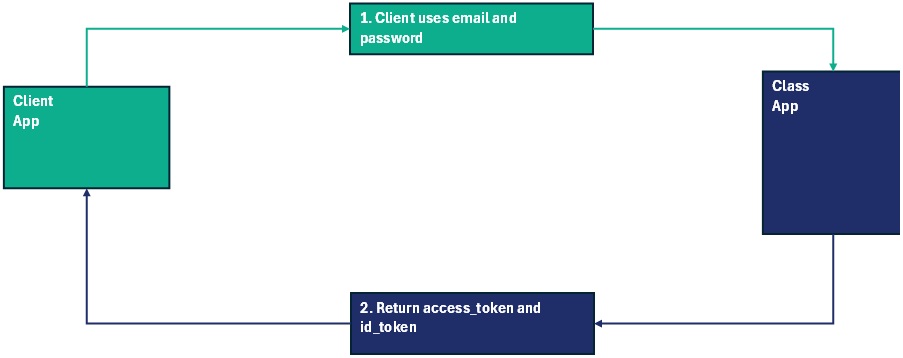
1. Send the user's credentials. Your integration posts the username and password to the token endpoint, identifying your integration and the scope you need.
2. Receive tokens. Class returns an access token and, if requested, an ID token.
- Production:
https://app.class.com.au/connect/token - PIE:
https://app.class-pie.com.au/connect/token
See Environments for the full set of hosts.
Requests in this flow require Basic authentication using the client_id and client_secret issued for your integration.
- Concatenate the
client_idandclient_secret, separated by a single colon:<client_id>:<client_secret> - Base64-encode that string.
- Send it in the
Authorizationheader, preceded byBasic.
Authorization: Basic PGNsaWVudF9pZD46PGNsaWVudF9zZWNyZXTvu78+The Authorization header is case-sensitive, including the word Basic.
| Parameter | Required | Value | Description |
|---|---|---|---|
grant_type | Yes | password | The OAuth 2.0 grant type being exchanged. Must be password. |
username | Yes | String | The username of the resource owner. |
password | Yes | String | The password of the resource owner. |
scope | No | Space-delimited list | The access being requested. See Authorisation Scopes. |
curl -X POST https://app.class-pie.com.au/connect/token \
  -H "Authorization: Basic PGNsaWVudF9pZD46PGNsaWVudF9zZWNyZXTvu78+" \
  -H "Content-Type: application/x-www-form-urlencoded; charset=utf-8" \
-d "grant_type=password&username=SampleUser&password=Samplepwd&scope=target:b/business fund.maintain"The token endpoint returns JSON.
| Property | Value | Description |
|---|---|---|
access_token | An access token | Used to access resources via the Class API. |
token_type | bearer | The Class API only supports Bearer tokens, so this is always bearer. |
expires_in | Integer | Seconds until the access token expires — typically 899. |
scope | Space-delimited list | The actual scope of the token, which may differ from what was requested. See Authorisation Scopes. |
id_token | An ID token | Optional. Included only if openid was in the requested scope. |
Success
{
  "access_token": "CBfgN5Z5...",
  "token_type": "bearer",
  "expires_in": 899,
  "scope": "target:b/OAUTH_TEST offline_access business.fund.create fund.read"
}
Error
{
  "error": "invalid_client",
  "error_description": "Client authentication failed"
}
See Error Codes for the full list of error values.
If your business operates several Class business codes, you can request that all of them be added to your OAuth credentials. You will still need a separate access token per business — a token is scoped to one business at a time.
- Authorisation Code Flow — the recommended alternative.
- Environments — hosts for PIE and production.
- Authorisation Scopes — what to request.